 NexRadio
01 / MUSIC LIBRARY
Your collection is the starting point.
Your station's music and imaging form the foundation. During setup, discuss how your tracks, categories and metadata will be transferred.
NEXRADIO / RADIO AUTOMATION IN THE CLOUD
From the library to the hour clock: discover how the parts of your station come together.
01 / MUSIC LIBRARY
Your station's music and imaging form the foundation. During setup, discuss how your tracks, categories and metadata will be transferred.
02 / PROGRAMMING
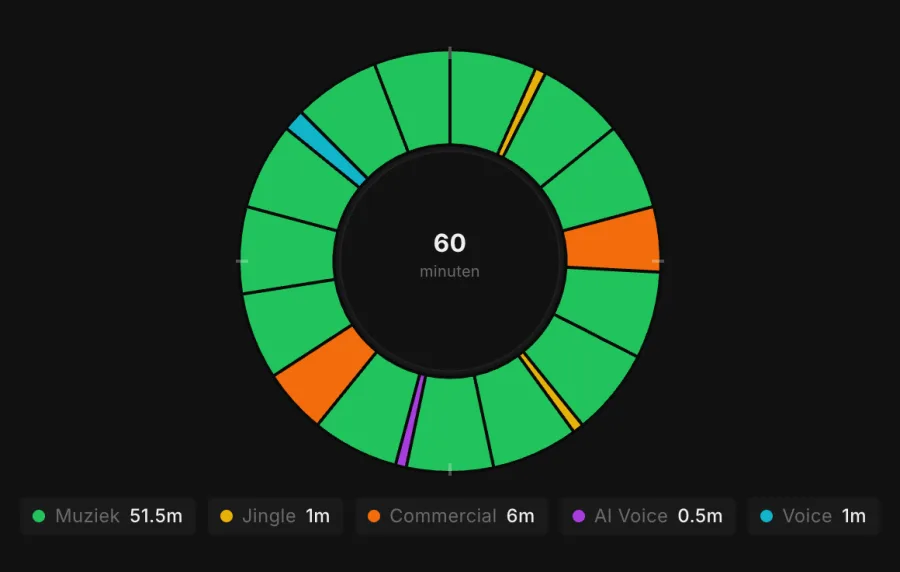
Use an hour clock to set the sequence of music, jingles and presentation. Give your format a recognisable structure.
03 / TRANSITIONS
Cue-in and cue-out points determine which part of a file plays and when the next item begins. During the demo, we show you the editor and let you hear the result.
04 / BROADCAST
View the planned hour and discuss how the broadcast and stream will be set up for your station. Capacity and support are specified in the proposal.
THE CALM BEHIND THE BROADCAST
A breakfast show calls for something different from an evening of music. An hour clock makes your station's structure visible.
YOUR OWN GPT AS THE CONTROLLER
Connect your own GPT to NexRadio. Describe how you want to structure an hour or which schedule you need. Your GPT passes the instruction to NexRadio, which executes it. Use your chatbot’s voice feature to speak the same instructions.
GPT → NEXRADIO
“Create the next hour’s schedule using my morning format.”
“Set up the next hour with more relaxed music and less presentation.”
Example instructions for your connected GPT. The connection is configured for your station.
Prefer to click? Broadcast clocks, schedules and settings remain available in the manual interface. Choose how you work for each task.
Experience setting up an hour and creating a schedule with your own GPT. Book a demo and discover how NexRadio fits the way you make radio.
A personal demo. No payment details required.